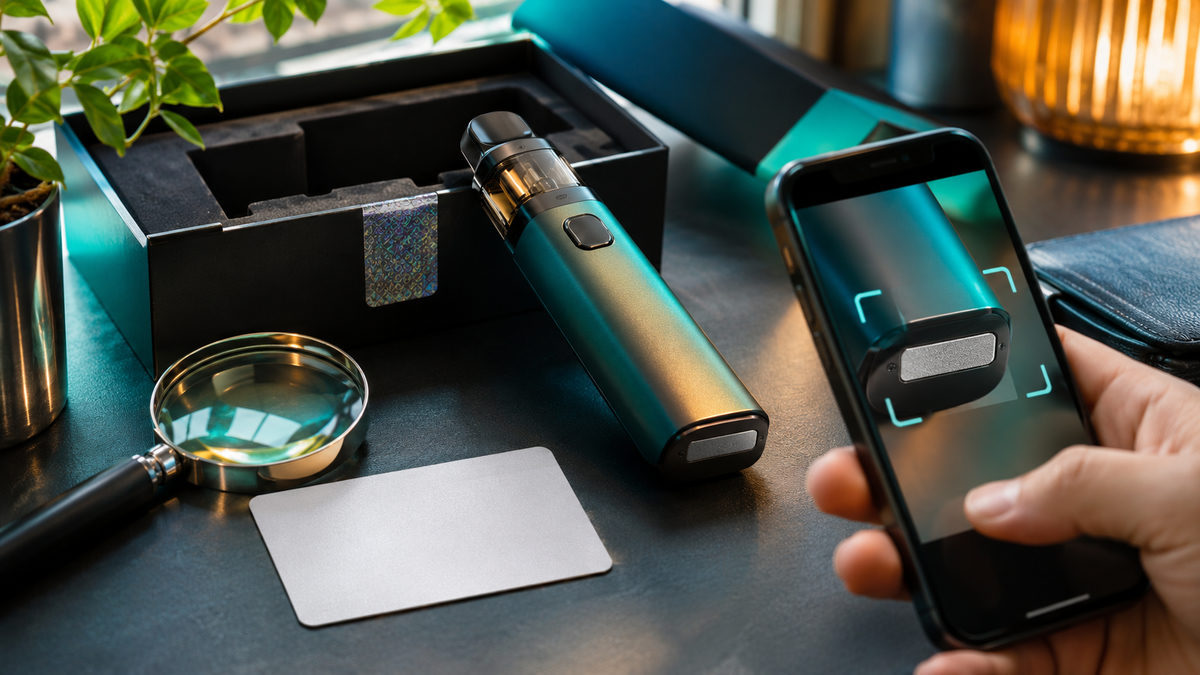
Could one tiny code tell you whether your vape is covered by a warranty—or raise a counterfeit warning? Understanding Vape Serial Numbers helps you identify devices, document purchases, and get reliable product support. But serial numbers, batch labels, QR symbols, and scratch-off codes often do different jobs. Knowing the difference can save you confusion when a code fails or the packaging seems suspicious.
A successful lookup offers useful evidence, but it cannot prove a device is safe. Counterfeiters sometimes copy genuine codes and recreate packaging with surprising accuracy. That is why you need to consider the code, seller, packaging, and physical construction together. This guide walks you through locating, recording, verifying, and protecting vape identification codes.
1. Understanding Vape Serial Numbers and Their Purpose
A vape serial number identifies an individual device or, in some cases, a particular production unit. Manufacturers may create these codes from letters, numbers, or a combination of both. They might print the identifier beneath a barcode or embed it in a machine-readable symbol. Format, length, and placement can vary widely by brand and product type.

Not every number printed on a vape is a unique serial number. Some codes identify the model, product family, color, production batch, or packaging design. For example, every device from one production run may share the same lot number. A genuine serial number typically distinguishes one unit from another, although there is no universal manufacturer standard.
Why manufacturers use these identifiers
Serial numbers serve several practical purposes throughout a product’s life. Customer-service teams use them to identify a device before discussing repairs or replacement options. Manufacturers may also link a number to factory records, inspection results, or distribution details. This gives support agents more accurate information when investigating a problem.
- Product identification: The number may confirm a device family, version, color, or regional configuration.
- Traceability: Manufacturers can connect affected units with production, distribution, or sales records.
- Quality control: Repeated complaints may reveal problems involving certain components or production runs.
- Recalls: Codes can help companies identify products requiring inspection, repair, or removal.
- Warranty service: Support teams may request the identifier before approving registration, repairs, or replacement.
- Customer support: The code helps agents distinguish similar models and recommend suitable troubleshooting steps.
Retailers may record identifiers when they receive inventory or complete a sale. A distributor can then use those records to trace products through its supply chain. This information is useful when investigating returns, suspected substitutions, or targeted safety notices. Privacy practices and recordkeeping standards, however, differ from one business to another.
Above all, a serial number is evidence—not certainty. A code may match official records while still appearing on a copied label. Likewise, a valid number says nothing definite about battery condition, liquid contents, legal compliance, or proper storage. Treat identification as one part of a broader product assessment.
2. Where to Find a Vape Device Serial Number
Turn off the device first and place it on a clean, dry surface. Inspect the exterior under bright light, but do not remove glued panels or protective parts. Some identifiers are faintly laser-engraved rather than printed in ink. Try tilting the device; shallow characters often become easier to spot.
Common locations on the device
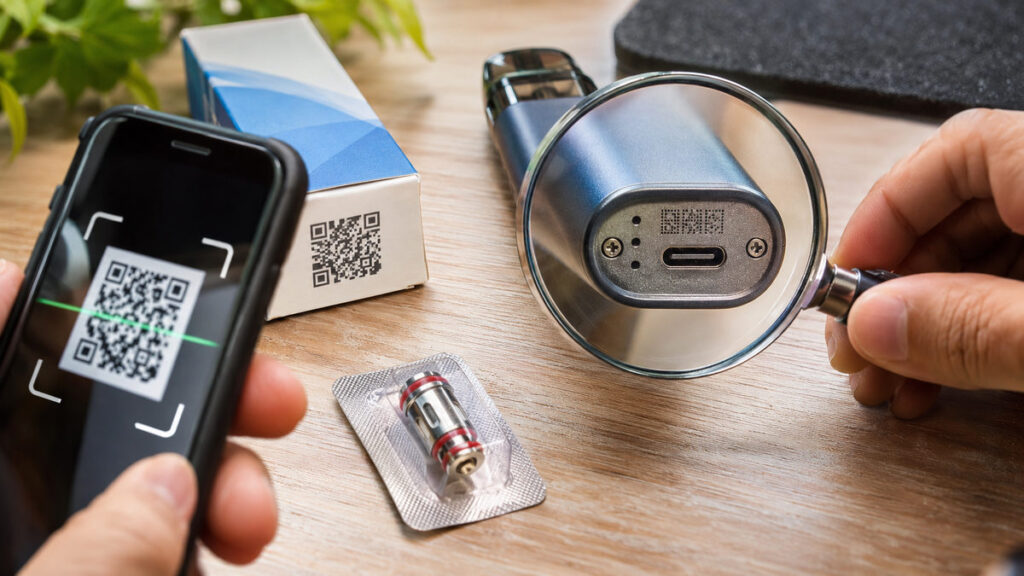
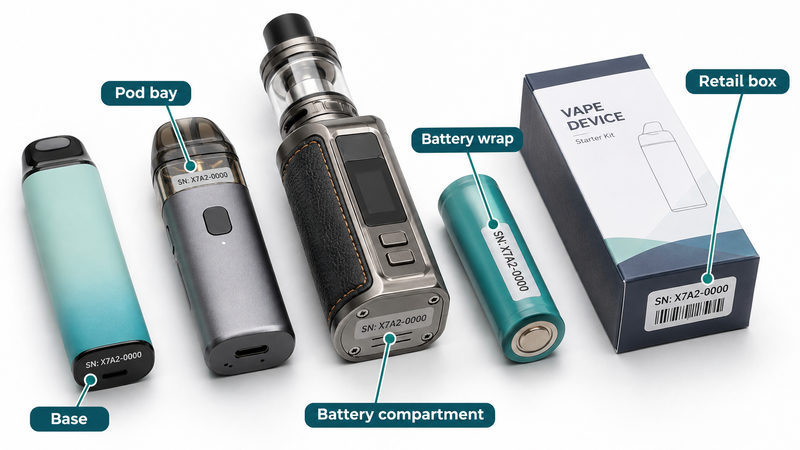
Manufacturers tend to place codes in protected areas where regular handling will not wear them away. Compact products, though, leave little space for readable markings. A magnifying glass or your phone camera’s zoom can help. Check these locations carefully:
- The main device body, particularly near regulatory markings
- The base or underside of the device
- Inside a removable battery compartment or battery bay
- Near the USB charging connection
- Under a removable pod or cartridge
- On the base of a tank or atomizer
- Beneath a magnetic battery door
- On a separate battery label or protective wrap
Never unwrap a battery or take apart a sealed device just to find a number. A damaged battery wrap can increase the risk of a short circuit. Keep metal tools away from charging ports and battery compartments as well. If no code is visible, unsafe disassembly is not the answer.
Codes printed on packaging
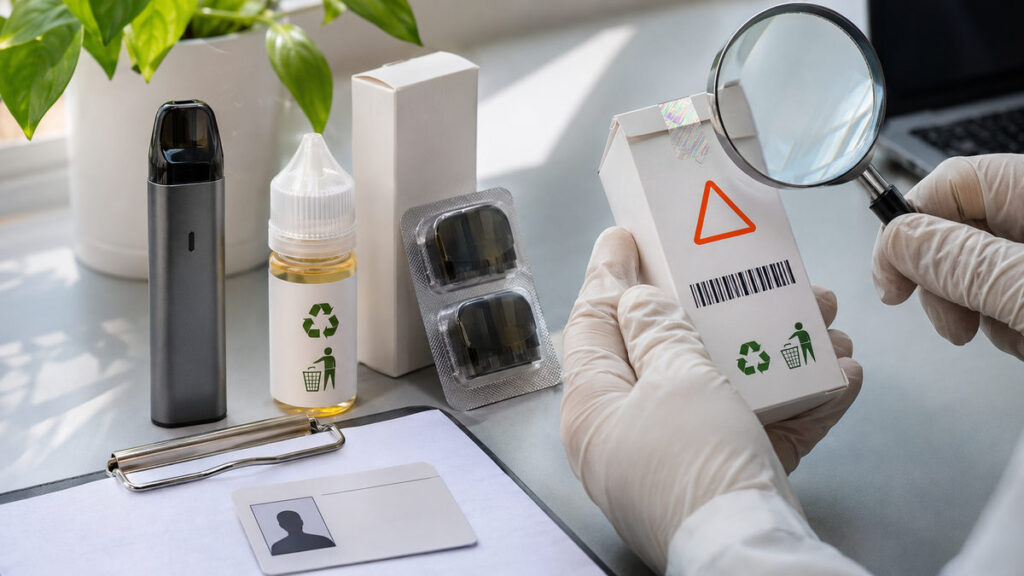
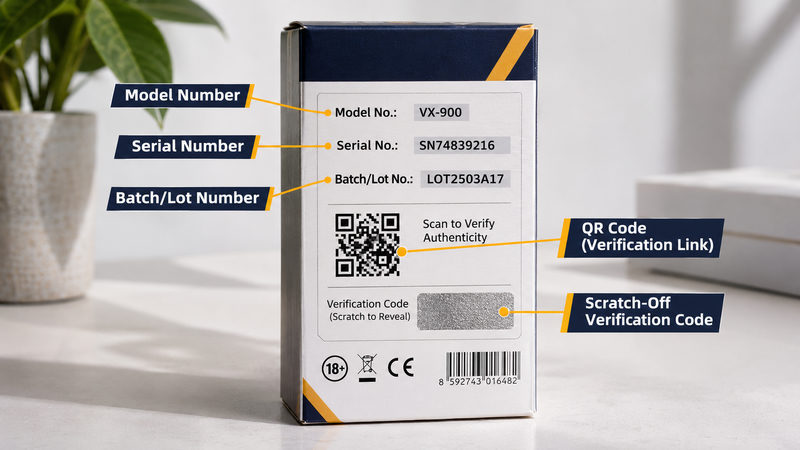
The outer box often carries more identification details than the device itself. Look closely at the product label, authenticity card, instruction insert, and warranty card. A scratch-off panel may hide a verification code rather than a serial number. Barcodes and QR symbols can also appear beside model, batch, and product information.
- Outer packaging labels and sealed box ends
- Authenticity or security cards
- Instruction manuals and registration inserts
- Warranty cards or service labels
- Scratch-off verification panels
- Retail stickers added by an authorized seller
Disposable vapes often use different labeling systems. A disposable might show only a batch, lot, product, or authentication code. That code could represent thousands of units rather than one specific device. Do not assume that every disposable has a unique serial number.
How locations vary by product type
Vape pens commonly carry identifiers near the base, charging area, or battery connection. Pod systems may place them on the underside, inside the pod bay, or on the original box. Larger mods usually have more room for detailed labels inside the battery door. Tanks and accessories, meanwhile, may display a model code or tiny engraving without having a unique serial number.
Separate batteries need extra care because their printed markings can look like serial information. In many cases, those labels simply describe the model, capacity, chemistry, or production batch. Never remove an intact wrap to search for hidden characters. Contact the battery supplier instead if the markings look altered, incomplete, or inconsistent.
Recording the code safely
Whenever possible, photograph the complete device and unopened packaging first. Then take a close-up of every code under even lighting. Copy all letters, numbers, spaces, and hyphens exactly as shown. It is easy to confuse zero with “O,” or one with “I.”
Compare the identifiers on the device and packaging only if the manufacturer says they should match. Two legitimate codes may perform different functions and look completely different. Keep the photographs, receipt, and seller details in a private record. Never post unused verification codes publicly.
3. Serial Numbers vs. Batch, Model, and Verification Codes
Several codes may appear side by side, but each can answer a different question. One may identify the individual device, while another refers to its design or production run. Read the surrounding label before trying a lookup. Terms such as “SN,” “S/N,” “LOT,” “Batch,” “Model,” or “Security” offer useful clues.
Serial and model numbers
A serial number usually separates one physical unit from another. Two identical pod systems, for example, may share a model number while carrying different serial numbers. Support teams often rely on the serial number to check unit-specific records. The model number identifies the broader design, range, or hardware family.
A model code can also describe size, power level, connector type, or regional version. Every unit in that version, however, may display the same code. Entering a model number into a serial lookup could therefore return an invalid result. Check the wording on the label and follow the support instructions before selecting a code.
Batch and lot numbers
Batch and lot numbers group products made under similar production conditions. One code might cover units assembled during the same run or made with related materials. Manufacturers use these groups during quality investigations and targeted recalls. It is therefore perfectly normal for many products to share an identical batch number.
A production date is sometimes built into a batch structure, but each manufacturer uses its own format and may change it without notice. Do not assume “0612” means June 12 or December 6. Ask the manufacturer to interpret the full code instead.
Product codes and SKUs
A product code or SKU helps a business manage its catalog and inventory. Different colors or package sizes, for example, may each receive their own code. Retailers use these codes to order stock, track variants, and process sales. An SKU rarely identifies one individual physical device.
A retailer may place its own barcode label over part of the original box. That sticker can serve the store’s inventory system without coming from the manufacturer. Compare its style and position with the rest of the packaging. Do not remove it if doing so might destroy useful evidence.
Verification and anti-counterfeit codes
Verification, security, authentication, scratch, and anti-counterfeit codes are mainly used for authenticity checks. A manufacturer may conceal one beneath a scratch layer so it cannot easily be copied before purchase. Its system might also record the first time someone checks the code. A warning about repeated checks is worth investigating.
A verification code is not necessarily a serial number. One package may contain both, along with a batch number and model label. Support teams may even request different codes for warranty and authenticity checks. Record each identifier together with its printed description so you do not mix them up.
What QR codes actually contain
A QR code is simply a container for data, not a particular type of product identifier. It can hold a website address, serial number, registration token, or verification request. Some QR symbols do nothing more than open product instructions or a promotional page. You will not know the purpose until you inspect the destination or the information displayed.
Be cautious with unfamiliar QR destinations. A copied symbol could lead to a polished imitation website. Before entering any information, manually compare the domain with the manufacturer’s officially published address. Never install an unknown application just because the packaging tells you to.
4. How to Perform a Vape Serial Number Lookup Safely
Start with the manufacturer’s official website, official mobile application, or verified customer-support channel. When possible, type the company’s known address directly into your browser. You can also use contact details found in reliable documentation supplied by the manufacturer. Do not trust a lookup page simply because it ranks first in search results.
A safe lookup process
- Identify whether the label shows a serial, authentication, batch, or product code.
- Open the manufacturer’s official verification or support page through a trusted route.
- Check the domain spelling, security connection, and company details before continuing.
- Enter the code exactly, including any letters, zeros, spaces, or hyphens.
- Scan a QR code only after reviewing its destination address.
- Compare displayed model, color, region, or production details with the physical product.
- Save a private screenshot showing the result, date, and relevant error message.
- Contact official support when any information remains unclear or inconsistent.
A legitimate basic check should not ask for excessive personal information. Be wary if a page demands payment details, identification documents, or unrelated account credentials. Refuse unexpected software downloads and browser extensions too. Verification normally needs only the product code and, occasionally, a simple security check.
Understanding lookup results
A valid result means the code you entered exists in the system. It does not prove the code is still attached to the original product. An invalid result could come from a typing mistake, the wrong type of code, an unsupported region, or a counterfeit label. Enter it again carefully before reaching a conclusion.
A previously checked or duplicate result has several possible explanations. Perhaps you or the retailer scanned it earlier. Then again, someone may have copied the code onto multiple packages. If the first-check date is available, compare it with the dates when you purchased and opened the product.
An expired result may relate to an older verification system or a limited registration period. A missing result could point to incomplete records, a regional database, or incorrectly entered characters. A mismatched result means the displayed product details do not match your device. Differences in model, color, or region should be reviewed by official support.
Why a valid result is not final proof
Counterfeiters can copy genuine serial numbers, verification labels, packaging designs, and QR codes. A single authentic code may end up on many imitation products. Look at the printing, construction, seller history, and product details along with the lookup result. No digital response alone can confirm the condition of a battery or the contents of a product.
Only share complete codes through official channels. Unofficial lookup sites may collect unused codes or redirect visitors to dangerous pages. Keep screenshots private unless support staff ask for them through a secure channel. Before sending documents, redact any unrelated receipt and payment information.
5. Authenticity, Warranty, and Troubleshooting Problems
Code verification is most useful when paired with a close physical inspection. Look for sharp printing, correct spelling, intact tamper seals, aligned labels, and consistent packaging. Check the device for loose panels, uneven gaps, damaged connections, or unusual components. An extremely low price or an unknown seller is another reason to be cautious.
Warning signs worth investigating
- The same supposedly unique code appears on multiple devices.
- A label looks replaced, cut, covered, or chemically altered.
- Device and packaging numbers should match but do not.
- The lookup displays another model, color, or market.
- Parts fit poorly, rattle, leak, or differ from official product information.
- The manufacturer does not recognize the advertised product variant.
- Packaging contains spelling errors or inconsistent safety markings.
A missing number does not automatically mean the product is counterfeit. Some accessories and disposable products simply do not have individual serial numbers. Label placement may also change because of regional packaging rules or production updates. Official support can tell you whether your exact product should carry one.
Fixing common lookup problems
If a label is damaged, photograph it several times from different angles. Indirect light can reveal faint engraving without adding glare. Still cannot read the characters? Avoid repeated guesses if the system limits the number of attempts. Send the images to official support instead.
When a lookup fails, confirm that you have the right type of code and check for easily confused characters. See whether the manufacturer operates separate regional verification pages. Save the exact error message and note the time of the lookup. Never scratch, peel, or aggressively clean a label, since that could destroy evidence.
If the device and packaging codes differ, first find out whether the manufacturer expects them to match. When matching is required, stop using the product while support investigates. Keep every layer of packaging and all messages from the seller. Those materials could help uncover a swapped device or a packaging error.
Warranty and business records
Serial numbers can help with registration, repairs, returns, and warranty claims. Companies may still require an eligible purchase date and proof that you bought from an authorized seller. Provide clear photographs, the model, code details, seller, purchase date, and receipt. Include packaging images, the error message, and a brief description of the problem as well.
Retailers may record identifiers while receiving products, making sales, and processing returns. Those records can help them investigate stock substitutions, supplier issues, and repeated claims. They also support supplier audits and targeted recalls. Businesses should still safeguard customer information and limit access to complete codes.
6. What to Do If You Suspect a Counterfeit Vape
Stop using the product if its authenticity, construction, or battery safety is uncertain. Do not charge, open, puncture, modify, or attempt to repair a suspicious device. Store it away from heat, water, metal objects, children, and pets. If it becomes hot, swollen, damaged, or starts hissing, follow local battery-safety guidance.
Keep the device, packaging, receipt, verification result, and messages from the seller. Contact both the seller and manufacturer, providing clear photographs and purchase details. You can also follow the relevant procedures offered by the marketplace, payment provider, consumer-protection agency, or product-reporting system. Never send a damaged lithium battery through ordinary mail without approved handling instructions.
Remember to protect your privacy. Public photos may expose full serial numbers, unused authentication codes, addresses, and payment details. Redact sensitive information before posting anything or sharing documents outside official support. Otherwise, counterfeiters could reuse the visible code on new packaging.
Frequently Asked Questions
Do disposable vapes have serial numbers?
Some do, but many rely on batch, lot, product, or authentication codes instead. Check the manufacturer’s labeling guidance for the exact model.
Can a code reveal the manufacturing date?
A batch code may contain date information, but manufacturers use different formats. Do not try to decode it by guessing. Ask official support to confirm it.
Can counterfeit products carry copied genuine codes?
Yes. Counterfeiters can reproduce valid serial numbers, QR symbols, and security labels. Pair code verification with checks of the product, seller, and packaging.
Does a missing serial number prove the product is fake?
No. Labeling practices vary between devices, accessories, markets, and product categories. Still, a missing number should be investigated if the product is expected to have one.
What does an invalid result mean?
It could mean you mistyped a character, entered the wrong kind of code, encountered regional limits, or found incomplete records or a counterfeit product. Save the error and contact official support.
Is a serial number enough for a warranty claim?
Usually not. The manufacturer may also ask for a receipt, purchase date, seller details, photographs, and a description of the issue. Warranty terms may exclude certain sellers or types of damage.
Should I share my code publicly?
No. Only share complete codes through trusted support channels. Hide serial numbers, QR codes, unused authentication codes, and personal receipt details in any public images.
Adult-use and safety note: Vape products are intended only for adults where legally permitted. Successful verification does not guarantee safe operation, legal compliance, genuine contents, or freedom from defects. Batteries may fail because of damage, improper charging, heat, or manufacturing problems. Stop using any device that leaks, overheats, swells, sparks, or behaves unusually.
Conclusion
Vape serial numbers and related codes can help with identification, traceability, recalls, warranty service, repairs, and authenticity checks. Their formats and purposes, however, vary between manufacturers and product categories. A batch number, model code, SKU, or security token can easily resemble a serial number. Identify the type of code before trying to interpret the result.
Verify codes only through the manufacturer’s official channel. Then weigh the response against the packaging quality, seller’s reputation, device construction, and official product records. Genuine numbers and QR labels can be copied. Even successful verification cannot guarantee safety, compliance, or defect-free operation.
Locate the codes on your device and packaging, then record them privately. Verify them through the manufacturer’s official system and keep your receipt. If the details conflict or the device seems unsafe, stop using it while you seek support. That brief pause could protect your warranty, privacy, and physical safety.